CoreviaFlowCOREVIAFLOWDIGITAL PROJECT COMPANY Leave a request
EN UA RU
IP telephonyUA

TurboSMS integration & automation

A text to the client goes out on its own the moment something happens in your CRM — and the delivery status comes back to their card

TurboSMS is a Ukrainian SMS service with an open programmatic connection: one way of sending covers a text, a Viber send by TurboSMS itself, and a hybrid where a message that did not reach Viber goes out as a text on its own. We connect it to your CRM or site, so a reminder, a confirmation code or an order status is sent by the event in your system, and TurboSMS itself reports the delivery status back to the client's card — without a manager typing the text by hand and then checking whether it arrived.

What we connect

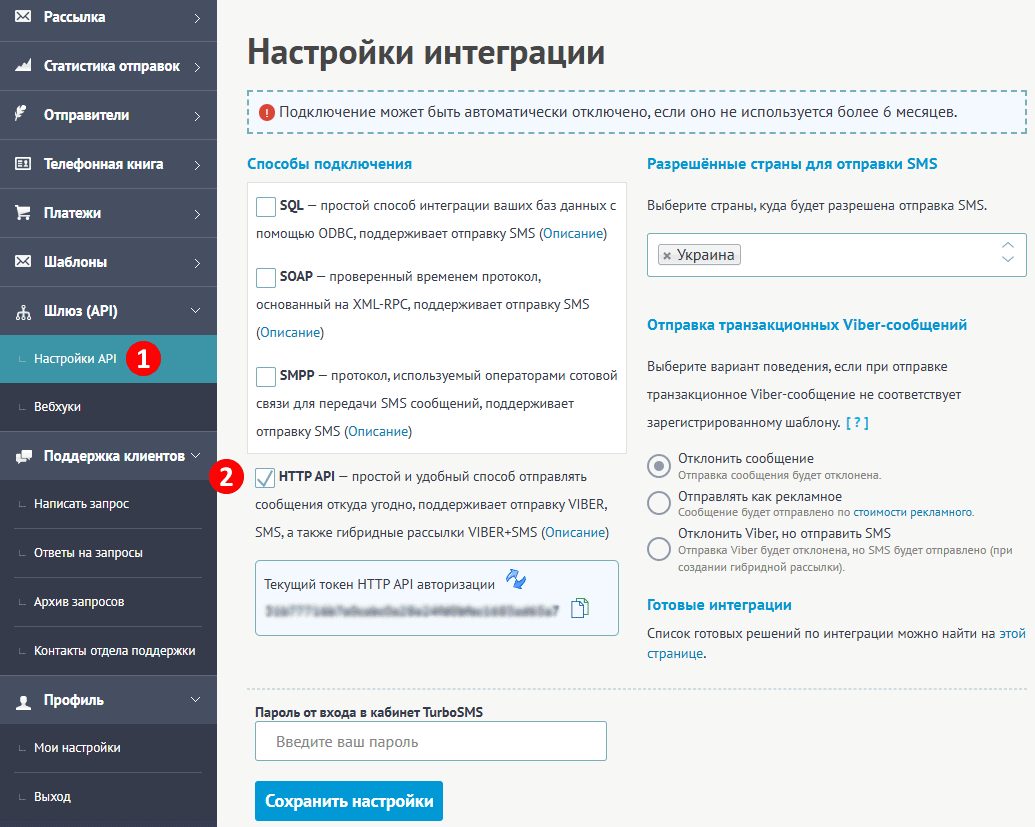
  • The access key is created in the TurboSMS account: it is enough to switch on the key-based connection in the settings. The key can be replaced at any moment, and it is stored on our side rather than passed around.
  • The sender name the client will see instead of a phone number is registered in advance and reviewed by the service's administrator. The request can be submitted straight from the connection, with all required fields filled in.
  • An event in your system — an order changed status, a visit was booked, a form was filled in — sends the message to the number from the client's card. The same way of sending covers a text, a Viber send by TurboSMS itself and the hybrid: if the message did not reach Viber, it goes out as a text on its own.
  • TurboSMS itself sends the delivery status — queued, sent, delivered, expired, not delivered, rejected — and we write it into the client's card, so nobody has to keep asking. Each such notice is signed with a secret key, and if our side is unavailable for a moment, TurboSMS keeps retrying on a growing schedule for 4.5 hours.
  • So that one event never turns into two identical texts, every request carries its own identifier: a repeated request with the same identifier within 30 days is not executed again and simply returns the earlier result.
  • Before launch we check the connection with a test request: each section of TurboSMS has a simple check method that answers whether the key is accepted and the link is alive. The key travels with every request, and the answers come back in a plain machine-readable form.

Automation scenarios

01

An order changes status

Before a manager types the “order shipped” text by hand and forgets it on a busy day.

After the status change in the CRM sends the text through TurboSMS on its own to the number from the client's card, with your company name instead of a phone number, and the card keeps a note that the message went out.

02

A reminder before a visit or a payment date

Before an administrator calls everyone on the list the day before, or writes to each person by hand.

After a day before the meeting or on the payment date the CRM sends a short text with the date and time on its own, and if the client does not show up, the manager sees on the card whether the reminder was delivered.

03

A confirmation code on the site

Before requests from the site arrive with typos in the phone number, and a manager wastes a call to find out the number belongs to someone else.

After the site sends a short code through TurboSMS, the client enters it in the form, and only a verified number reaches the CRM. The request identifier keeps one click from turning into two identical codes.

04

A text did not reach the client

Before the text was sent, but nobody knows whether it arrived — and later the client says they never got anything.

After TurboSMS itself sends the delivery status, and the client's card shows “delivered”, “not delivered” or “expired”. If the message did not arrive, the manager sees it at once and calls instead of waiting for a complaint.

05

A Viber send by TurboSMS itself, with a fallback to text

Before the same news has to be sent twice — in one service for Viber and in another for text, and some clients get it twice or not at all.

After one send goes out from the CRM through TurboSMS: for those who gave consent, the message goes via Viber by TurboSMS itself, and if it did not reach them there, TurboSMS itself sends it as a text. One send — one result on every client's card.


How it works technically

For those who want to check: each point links to the official documentation page it comes from.

  • The access key for the programmatic connection is created in the TurboSMS account: it is enough to switch on the key-based connection in the settings, and the key can be changed at any moment.

    Source: turbosms.ua ↗ checked 2026-09-28
  • One sending method covers texts, Viber sends by TurboSMS itself and the hybrid: if a message was not delivered in Viber, it is automatically sent as a text.

    Source: turbosms.ua ↗ checked 2026-09-28
  • Instead of being asked all the time, TurboSMS itself sends notices about events — delivery statuses of texts and Viber messages, incoming Viber messages, button clicks.

    Source: turbosms.ua ↗ checked 2026-09-28
  • Notices are signed with a secret key, and if the receiving side fails, TurboSMS repeats the send on a growing schedule for 4.5 hours.

    Source: turbosms.ua ↗ checked 2026-09-28
  • A sender name can be registered straight through the connection: the request is created with all required fields and goes to moderation at once.

    Source: turbosms.ua ↗ checked 2026-09-28
  • Protection from duplicates: if you pass your own request identifier, a repeated request with the same identifier within 30 days is not executed a second time and returns the earlier result.

    Source: turbosms.ua ↗ checked 2026-09-28

Limits

First, the sender name: no longer than 11 characters, Latin letters, digits and a few signs only, registered in advance and reviewed by the service's administrator, and someone else's brand needs written proof of the rights to it. A Viber send by TurboSMS itself needs a contract with the service and your own activated Viber sender — according to TurboSMS, activation takes from 1 to 10 days — and only people who gave explicit consent may receive it; service messages to Ukrainian numbers must match a template registered in advance, otherwise they are rejected. Cyrillic shortens a text: one segment holds 160 Latin characters but only 70 Cyrillic ones, and a single Cyrillic letter is enough for the whole message to be counted at 70 per segment; the ceiling is 1521 Latin or 661 Cyrillic characters (10 segments), and up to 1000 characters for Viber. Per number: up to 5 messages in 10 seconds and up to 10 in 60 seconds, and the same text within 90 seconds counts as a duplicate; one send holds no more than 5000 recipients, and numbers must be in international format.

Screenshots

TurboSMS: SMS and Viber campaigns for business
TurboSMS sends SMS and Viber messages from its own service; the CRM hands it the text and the phone number. Source: turbosms.ua ↗
TurboSMS cabinet: integration settings and API access
Integration settings in the TurboSMS cabinet: here the API token and sender name are set before the CRM can send messages. Source: turbosms.ua ↗

How to start

Three steps from a first message to work on your project.

  1. 01

    Leave a request

    Describe the task in the form — in text or by voice. Budget and timing are optional.

  2. 02

    We review and estimate

    A developer studies the brief, asks about anything unclear and sends an estimate.

  3. 03

    We start

    Once scope and price are agreed, the work begins.

or write to info@coreviaflow.space

Questions

Will the client see our company name instead of a phone number?
Yes, once the sender name is registered and reviewed by the TurboSMS administrator. The name is no longer than 11 characters in Latin letters, and if it is someone else's brand, written proof of the rights to it is needed. We submit the request straight from the connection.
Why does a Cyrillic message split into several parts?
One text segment holds 160 Latin characters but only 70 Cyrillic ones — and a single Cyrillic letter is enough for the whole message to be counted at 70. That is why we fit reminder and status templates into a short text in advance.
Do we have to connect Viber?
No. Viber here is a sending channel of TurboSMS itself, not our channel of communication, and it needs a contract with the service, your own activated sender and the recipients' consent. Texts need none of that: reminders, codes and statuses work over SMS. If you already have a Viber sender, we switch on the hybrid: did not reach Viber — goes out as a text.
How do we know the text arrived?
TurboSMS itself sends the delivery status, and we write it into the client's card: delivered, not delivered, expired. The notices are signed with a secret key, and if our side is unavailable for a moment, TurboSMS keeps retrying for 4.5 hours — the status is not lost.

Tell us what needs to be connected

Describe the task in text or a voice message. We look at your setup and reply with a plan.