CoreviaFlowCOREVIAFLOWDIGITAL PROJECT COMPANY Leave a request
EN UA RU
E-commerce platformsUA

Prom.ua integration & automation

Marketplace orders that land in the CRM by themselves, and statuses, waybill numbers and stock that go back to Prom without retyping

Prom.ua is the largest Ukrainian marketplace, and for many stores it is the main source of orders. Its seller cabinet can be managed from outside: a company registered on the portal gets remote access to its orders, messages, customers and products from its own software. Corevia CRM uses exactly this access, so a manager works in one place — the order card — while the order itself, its status, the waybill number, the answer to the buyer and the stock update travel between Prom and the CRM in the background.

What we connect

  • Orders from Prom appear in the CRM with what the marketplace already knows: the buyer, the address, the chosen delivery and payment methods and the items. The CRM asks Prom for orders created or changed since the last check, so nothing is lost and nothing is duplicated.
  • When the manager moves an order along in the CRM, the status goes back to the Prom cabinet — for one order or for a whole batch at once. The buyer sees the current state on Prom without anyone opening the cabinet.
  • The waybill number created in the CRM or in the carrier's cabinet is saved into the Prom order. Prom describes this exactly for declarations that were not generated in its own cabinet, so a Nova Poshta shipment made from the CRM shows up on Prom with its number.
  • Stock and prices on Prom are updated from your records. Products are matched by your own article number (the external identifier), so the CRM does not need to know Prom's internal product numbers.
  • A whole catalogue can be loaded onto Prom from a file — xls, xlsx, csv or xml — by a link or by uploading the file, and the CRM then checks how the import went.
  • Buyer messages from Prom are visible in the CRM, and the reply is sent to the buyer through the Prom cabinet, so the conversation stays where the buyer expects it.
  • Access is a single company key that Prom staff issue on request; all exchanges run over a secure connection, and Prom recommends trying the connection on a separate test company first.

Automation scenarios

01

Morning, fifteen new orders on Prom

Before the manager opens the Prom cabinet, reads each order and retypes the buyer, phone, address and items into the CRM, then goes back to Prom to set the status.

After the orders are already in the CRM with the buyer and delivery details, the manager confirms them from the card, and the status on Prom changes on its own.

02

Shipping day with Nova Poshta

Before the waybill is created in the carrier's cabinet, its number is copied into the CRM and then pasted once more into the Prom order so the buyer can track it.

After the waybill is created from the order card, and its number is saved into the Prom order and shown to the buyer without a second copy-paste.

03

The last unit sold in the offline shop

Before the product is still shown as available on Prom, a buyer orders it, and the manager has to call and apologise.

After the stock change in your records is sent to Prom by article number, and the product is marked as out of stock before the next buyer sees it.

04

A buyer asks a question under the order

Before the question sits in the Prom cabinet until someone remembers to check it, and the answer is typed there separately from the order history in the CRM.

After the message is visible next to the order in the CRM, the manager answers from the card, and the reply reaches the buyer through Prom.

How it works technically

For those who want to check: each point links to the official documentation page it comes from.

Limits

Prom describes its remote access as a closed beta for a limited number of companies: the company key is issued by Prom staff on request, so the connection starts with a request to Prom and cannot be switched on by the seller alone. The documentation does not describe notifications from Prom about new orders or messages, so the CRM asks Prom for changes on a schedule using the last-change filter, and an order appears in the CRM a few minutes after it is placed rather than instantly. All dates and times in the exchange are in UTC, and the CRM converts them to Kyiv time. Prom recommends trying the connection on a separate test company before the real one. Revoking the key means changing the cabinet owner's password and asking Prom for a new key, and all old keys stop working at once — so every tool that used the old key has to be updated together.

Screenshots

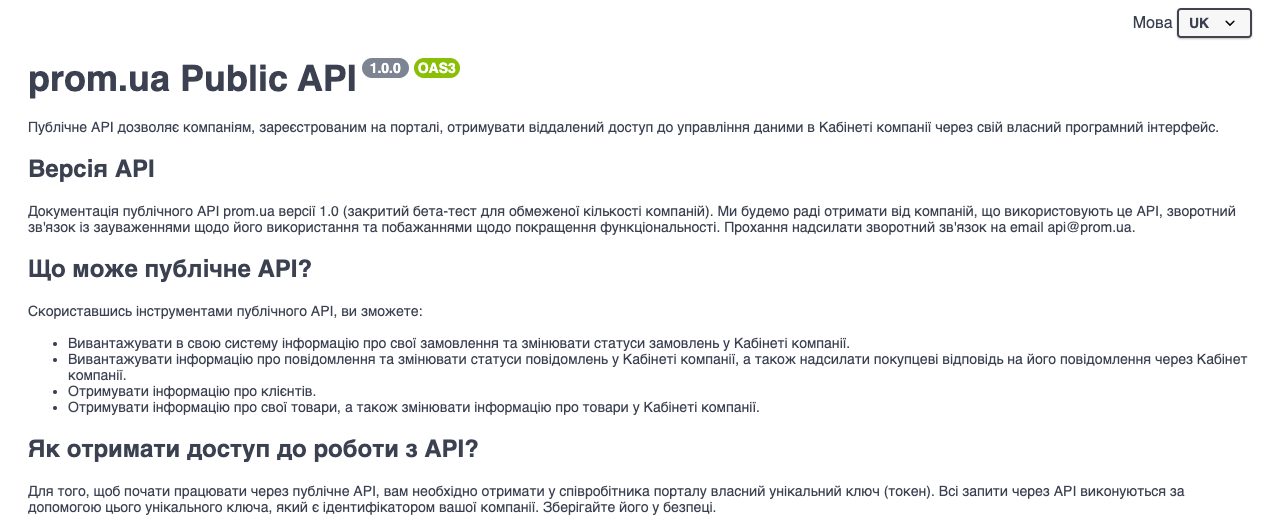
Prom.ua public API documentation: what the remote access can do — upload orders and change their statuses, read and answer buyer messages, get customer data, read and change products
What the Prom cabinet lets software do Source: public-api.docs.prom.ua ↗
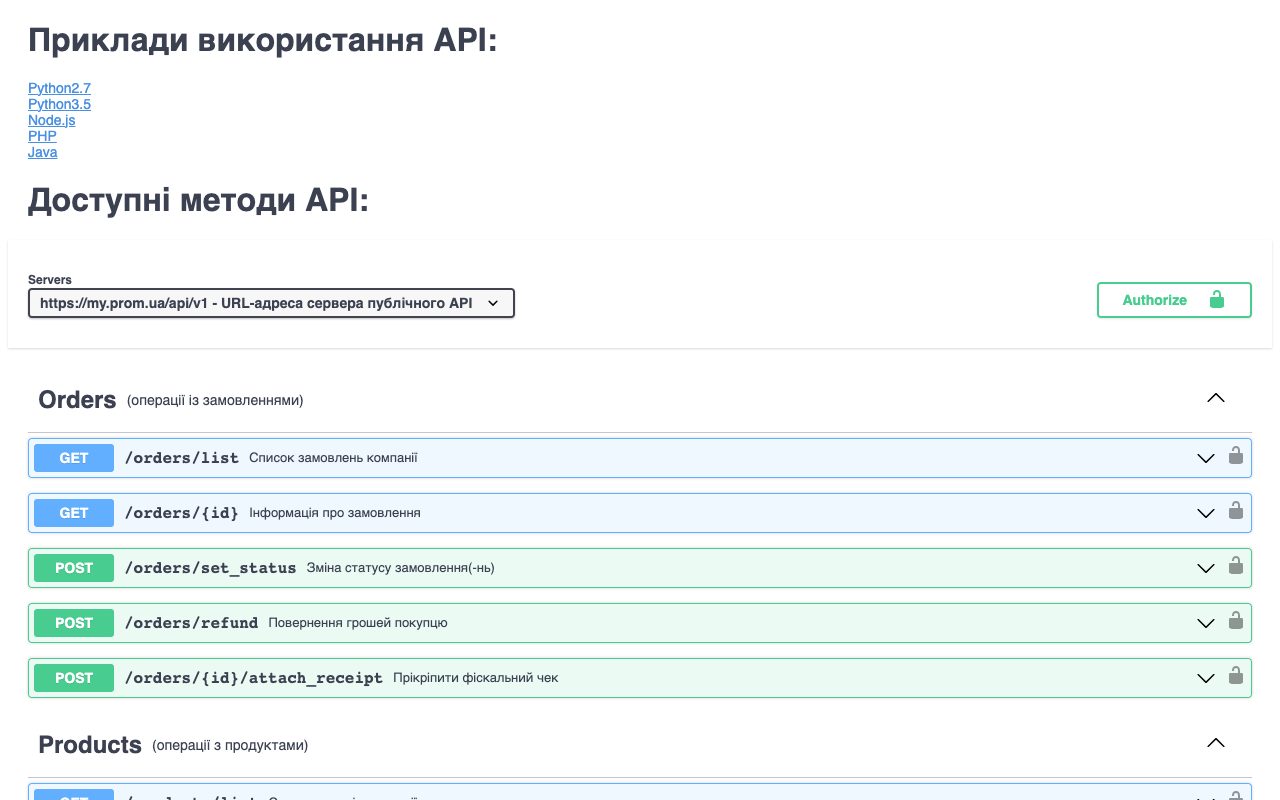
Prom.ua public API method list, Orders section: list of company orders, order details, changing order status, refund to buyer, attaching a receipt
Order operations available to the CRM Source: public-api.docs.prom.ua ↗

How to start

Three steps from a first message to work on your project.

  1. 01

    Leave a request

    Describe the task in the form — in text or by voice. Budget and timing are optional.

  2. 02

    We review and estimate

    A developer studies the brief, asks about anything unclear and sends an estimate.

  3. 03

    We start

    Once scope and price are agreed, the work begins.

or write to info@coreviaflow.space

Questions

How do we get access — can we switch it on in the Prom cabinet ourselves?
Not by yourself. Prom issues a unique company key through its staff, and the documentation calls this access a closed beta for a limited number of companies. We prepare the request together with you; once the key is issued, the connection is set up in the CRM.
Will a new Prom order appear in the CRM the same second?
Not the same second. The documentation does not describe messages from Prom about new orders, so the CRM asks Prom on a schedule for orders created or changed since the last check. In practice the order shows up within minutes, and no order is skipped because the check uses the last-change date.
We ship with Nova Poshta from the CRM. Will the buyer see the waybill number on Prom?
Yes. Prom has a method that saves the number of a declaration created outside its cabinet into the order. The CRM creates the waybill from the order card and passes its number to Prom, so the buyer sees it in the usual place.
Do we have to re-upload the whole catalogue every time the stock changes?
No. Individual products are edited by your own article number, so the CRM sends only what changed. A full file import — xls, xlsx, csv or xml by link — is there for the first load or a big catalogue update, and the CRM can check the import status afterwards.

Tell us what needs to be connected

Describe the task in text or a voice message. We look at your setup and reply with a plan.