CoreviaFlowCOREVIAFLOWDIGITAL PROJECT COMPANY Leave a request
EN UA RU
Accounting & ERPEU

SAP integration & automation

An order confirmed in the CRM becomes a sales order in SAP, the invoice and the payment from SAP show up on the client's card, and the customer list stays the same in both systems without retyping.

SAP is the accounting and resource-planning system of large and mid-sized companies: S/4HANA Cloud for the big ones, Business One for the mid-sized. Sales usually live somewhere else — in a CRM, in messengers, in spreadsheets — and every deal has to be entered into SAP a second time by hand: the customer, the order, the invoice. CoreviaFlow connects your CRM and SAP so the data goes over once and comes back on its own: the sales team sees invoices and payments, the accountants receive orders without phone calls and screenshots.

What we connect

  • We find out which SAP you run: S/4HANA Cloud (public or private edition), an on-premise installation or Business One, and who administers it. The way in differs between editions, and access is opened by the SAP administrator on your side.
  • Together we decide what travels and in which direction: customers, sales orders, invoices, payments, stock balances. Usually it is two or three objects, not the whole ERP.
  • Your SAP administrator creates a technical user whose access is limited to those objects. We never need anyone's personal login.
  • We set up the programmatic connection through SAP's official interfaces and match the fields: customer codes, item codes, tax settings, currencies. This is where most of the care goes, because SAP rejects a record if a code is missing.
  • We run a test on a few real customers and orders next to your current process and compare the figures with your accountant before switching anything off.
  • Where SAP can announce a change itself (order status, payment received), the CRM gets it at once; where it cannot, the CRM asks SAP on a schedule you choose.
  • Go-live and monitoring: if SAP refuses a record (blocked customer, missing code), the responsible person receives a notice with the reason instead of a silent gap.

Automation scenarios

01

A confirmed deal becomes a sales order in SAP

Before the manager sends the order to the accountant in a messenger, the accountant retypes it into SAP, item codes get mixed up and the order waits until the next morning.

After the moment the deal is marked won, a sales order appears in SAP with the customer, the items and the prices from the CRM; the accountant only checks it.

02

Invoices and payments are visible on the client's card

Before the manager asks the accountant 'has he paid yet?' several times a day, and the debt is discovered when the next shipment is already loaded.

After the invoice from SAP and its payment status appear on the client's card; the manager sees the debt himself and the shipment is held before it leaves.

03

One customer directory in both systems

Before a new client is created twice under slightly different names, reports from the CRM and from SAP never match, and someone spends a day reconciling them.

After a client created in the CRM appears in SAP as a customer record with the same code; a change of address or details in one system is reflected in the other.

04

Stock balances in the sales conversation

Before the manager promises delivery in three days and then learns from the warehouse that the item ran out last week.

After the CRM shows the balance from SAP next to the item, and the manager promises only what is in stock.


How it works technically

For those who want to check: each point links to the official documentation page it comes from.

  • SAP S/4HANA Cloud Public Edition is a cloud ERP with built-in AI covering finance, supply chain, HR and sales.

    Source: www.sap.com ↗ checked 2026-09-28
  • S/4HANA Cloud is open and extensible: it ships with ready-to-go APIs, tools and documentation for integrating with other systems.

    Source: www.sap.com ↗ checked 2026-09-28
  • SAP Business Accelerator Hub (api.sap.com) is the official catalogue where SAP's APIs, including S/4HANA, can be discovered and tested; there are REST, OData and SOAP APIs.

    Source: developers.sap.com ↗ checked 2026-09-28
  • SAP Integration Suite is SAP's integration platform (iPaaS) that connects SAP and third-party applications such as Salesforce, Workday, AWS and ServiceNow.

    Source: www.sap.com ↗ checked 2026-09-28
  • S/4HANA Cloud can send outbound events — SAP has an official tutorial on configuring them.

    Source: developers.sap.com ↗ checked 2026-09-28
  • SAP Business One synchronises warehouse and accounting in real time: a goods receipt can automatically create an accounts payable invoice.

    Source: www.sap.com ↗ checked 2026-09-28

Limits

SAP comes in several editions — S/4HANA Cloud public and private, on-premise installations, Business One — and each opens up to outside systems differently, so the way of connecting is confirmed only after we know your edition. Access to the system is opened by your SAP administrator through a technical user; without an administrator on your side the connection cannot start. Test calls through SAP's public catalogue (api.sap.com) require a personal API key in every request. SAP Integration Suite is a separate platform inside SAP's cloud (BTP), not a part of the ERP itself, so using it needs a BTP account. Updates of the public cloud edition are installed by SAP on its own schedule, which is why the connection is checked after every release. Details of Business One (the objects available to outside systems) are confirmed at the start of the project.

Screenshots

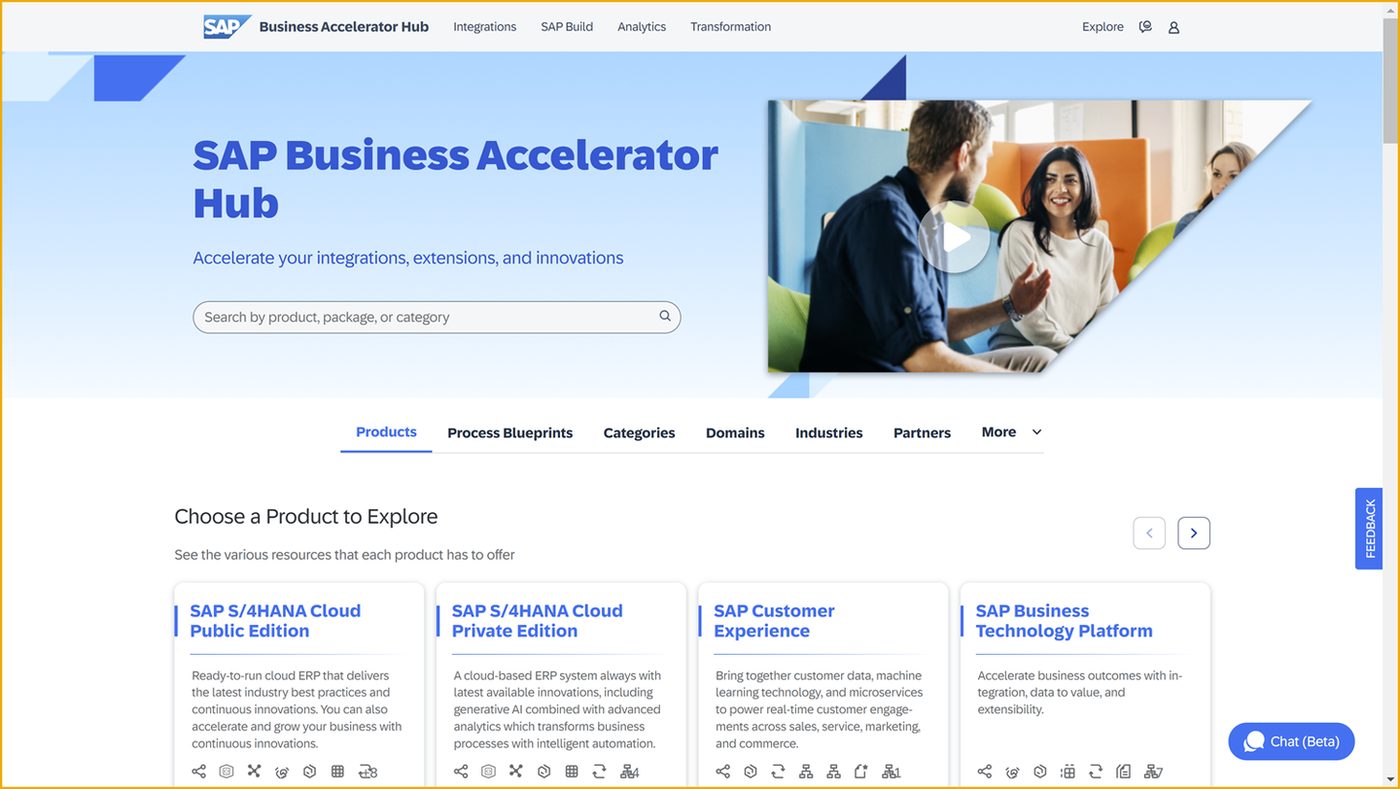
SAP Business Accelerator Hub: catalogue of SAP APIs and integrations
The SAP Business Accelerator Hub is where SAP publishes the interfaces of S/4HANA Cloud and other products; this is where we check which objects can be connected before the project starts. Source: developers.sap.com ↗
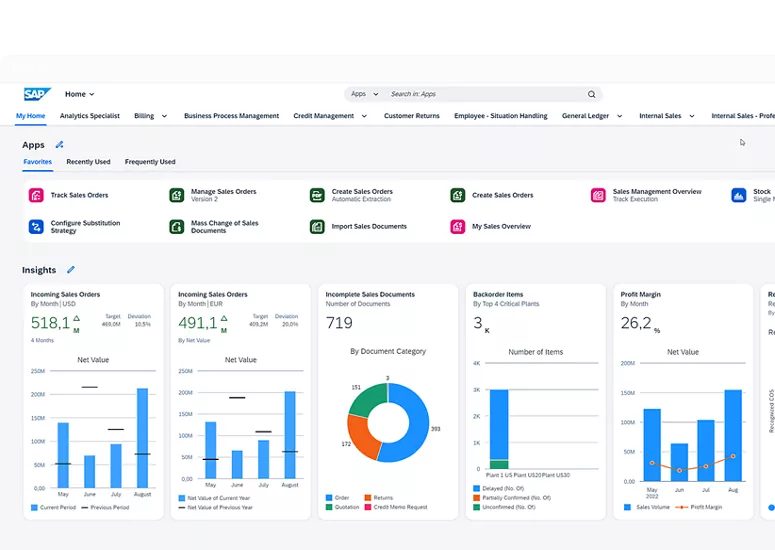
SAP S/4HANA Cloud: the ERP workspace with finance and sales figures
The S/4HANA Cloud workspace as SAP shows it: orders, invoices and payments live here, and the CRM connection brings the sales-related part of them to the manager's screen. Source: www.sap.com ↗

How to start

Three steps from a first message to work on your project.

  1. 01

    Leave a request

    Describe the task in the form — in text or by voice. Budget and timing are optional.

  2. 02

    We review and estimate

    A developer studies the brief, asks about anything unclear and sends an estimate.

  3. 03

    We start

    Once scope and price are agreed, the work begins.

or write to info@coreviaflow.space

Questions

Which SAP do you connect?
S/4HANA Cloud and Business One. The approach differs by edition — public cloud, private cloud or your own installation — so on the first call we ask which one you have and who administers it, and only then promise the specifics.
Do we need our own SAP consultant?
You need an SAP administrator who can create a technical user and confirm which objects it may touch. The connection itself, the field matching and the testing are on us.
Will the connection break when SAP updates itself?
The public cloud edition is updated by SAP on its own schedule. We build on SAP's official interfaces, which change rarely, and run a check after each release so a change is noticed before your team feels it.
Can accounting keep working only in SAP?
Yes. Accountants do not open the CRM; the CRM only sends them orders and customers and reads back invoices, payments and stock — the things the sales team needs.

Tell us what needs to be connected

Describe the task in text or a voice message. We look at your setup and reply with a plan.