
A payment comes in
Before staff checks Mollie's dashboard and updates the order by hand.
After the confirmed payment updates the order status on its own.
 Payments & POSEU
European payment methods connected straight to the order that's waiting on them
Mollie is a Dutch payment system built around the payment methods European buyers actually use. We connect it to your store or CRM so a finished payment updates the order on its own, and we choose the safest way to give access for the task — never handing out one all-purpose key where a narrower, revocable connection will do.
Before staff checks Mollie's dashboard and updates the order by hand.
After the confirmed payment updates the order status on its own.
Before handing over one permanent key to every outside tool is a real risk if it ever leaks.
After a revocable sign-in style link — Mollie's own recommendation — is used instead, so access can be cut off without touching anything else.
Before a sudden rush of orders risks being flagged and blocked as if it were abuse.
After built-in room for short bursts means a temporary spike isn't treated as a problem on its own.
Before no clear idea of when it's safe to try again.
After Mollie states exactly how many seconds to wait, so the next attempt is timed precisely instead of guessed.
For those who want to check: each point links to the official documentation page it comes from.
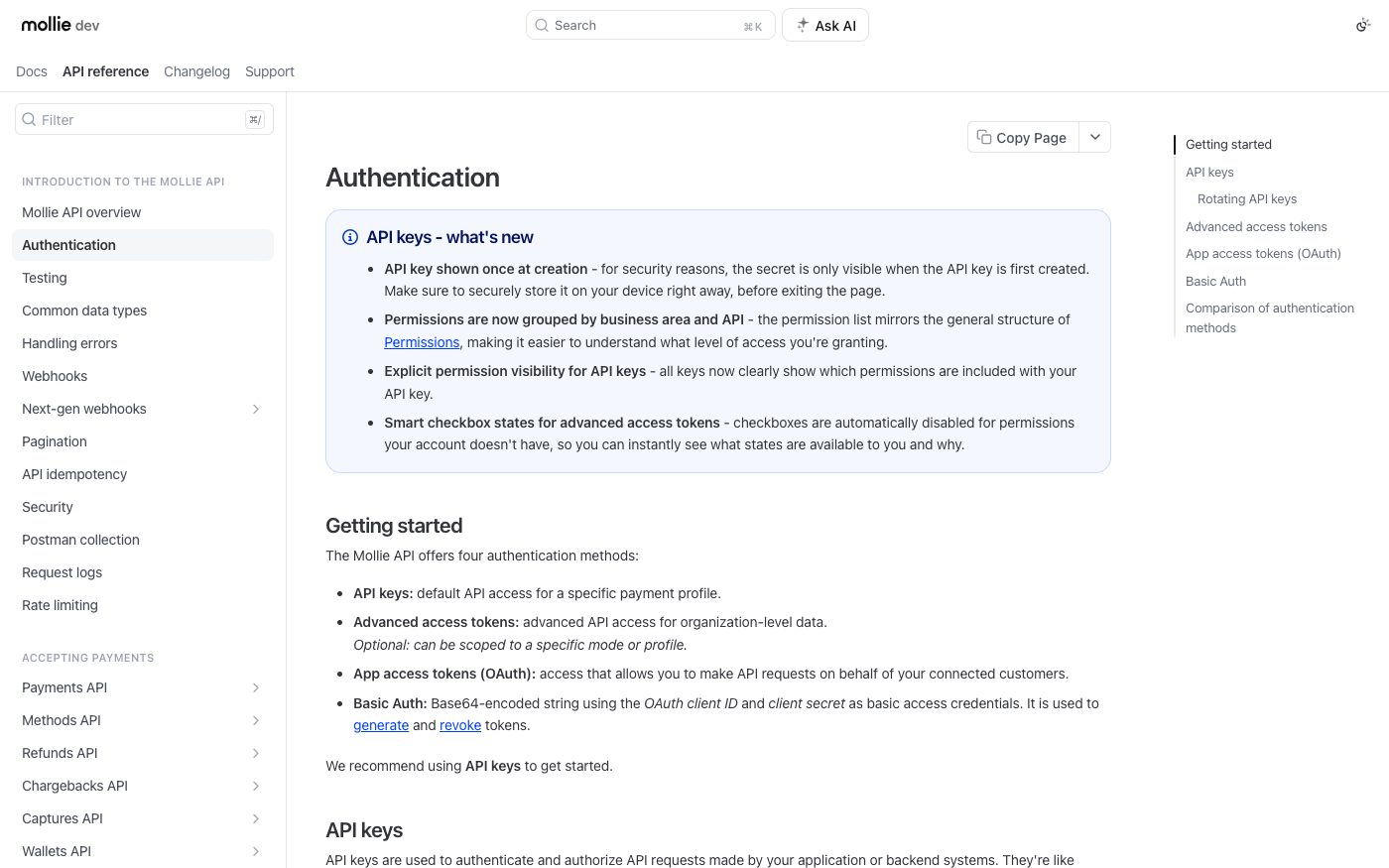
Mollie offers four ways to authorize a connection: a key tied to one store, a broader key for the whole organization, a revocable sign-in style link for apps acting on a client's behalf, and a basic sign-in check just for issuing or cancelling those.
Source: docs.mollie.com ↗ checked 2026-09-25A key's secret value is shown only once, at the exact moment it's created, so it has to be saved safely right away.
Source: docs.mollie.com ↗ checked 2026-09-25Mollie itself recommends not handing a permanent key to outside tools, and using the revocable sign-in style link instead.
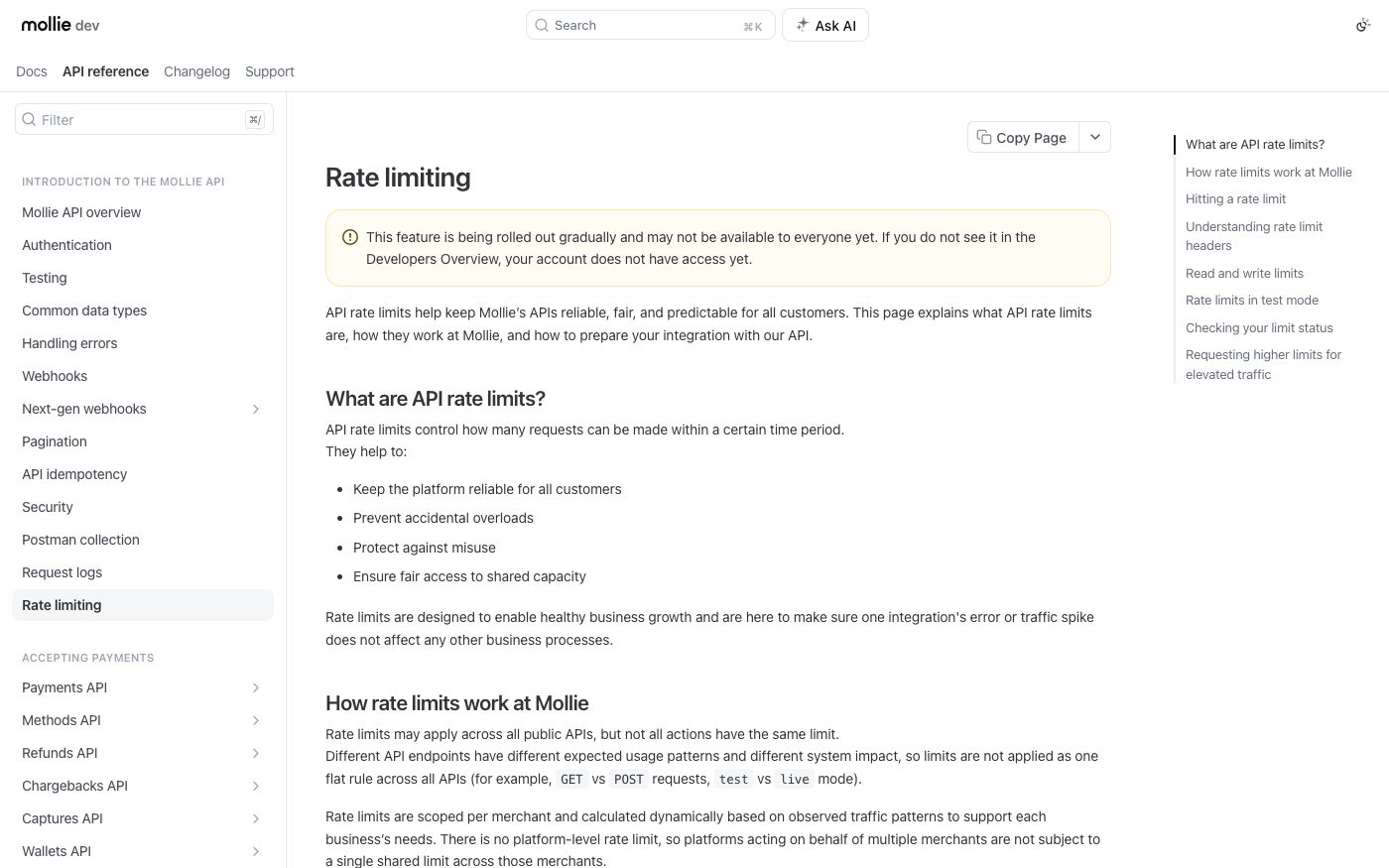
Source: docs.mollie.com ↗ checked 2026-09-25How many requests per second a connection can send isn't fixed for everyone — Mollie works it out individually per business, based on that business's real traffic.
Source: docs.mollie.com ↗ checked 2026-09-25There's built-in room for short traffic bursts above the usual pace, so a temporary spike isn't automatically treated as abuse.
Source: docs.mollie.com ↗ checked 2026-09-25Mollie calculates the request ceiling individually per business rather than using one number for everyone, and the feature is still rolling out gradually — it may not yet be visible on every account.
Three steps from a first message to work on your project.
Describe the task in the form — in text or by voice. Budget and timing are optional.
A developer studies the brief, asks about anything unclear and sends an estimate.
Once scope and price are agreed, the work begins.
or write to info@coreviaflow.space
Describe the task in text or a voice message. We look at your setup and reply with a plan.
Four services people come to us for most often. Each page explains what we do, how the work goes and where to start.
Choose the system, set up the pipeline, migrate data, train the team.
Learn more →Accounting, telephony, website, payments and messengers feed the CRM on their own.
Learn more →Orders, requests and answers around the clock, straight into your CRM.
Learn more →Flows between CRM, email, spreadsheets, payments and AI, on your own server.
Learn more → Payments & POSUS
One checkout for 125+ local payment methods, plus automatic tax and subscription billing
See scenarios → Payments & POSUS
Payments accepted worldwide, tied straight into the order that's waiting on them
See scenarios → Payments & POSUA
Payments with a hold before charging and scheduled recurring charges for subscriptions
See scenarios → Payments & POSUA
Card payments that connect straight to the Checkbox cash register, plus 50+ ready platform connections
See scenarios → CRMEU
CRMEUThe deal-focused CRM: connect it once, and deals, contacts and follow-ups keep themselves in sync
See scenarios → Payments & POSUA
The cash register that sends the receipt to the tax office the moment payment goes through
See scenarios →Implementation · Development · Integrations →
Mollie is a trademark of its owner. CoreviaFlow is not affiliated with it unless stated otherwise. Screenshots are taken from public vendor materials; the source is shown under each one.